Application Orchestration
Murmer’s core gives you actors, messages, and clustering primitives. The app module (enabled via the app feature flag) builds on top of these to provide the application-level abstractions you need for real, working distributed applications: placement strategies, leader election, crash recovery, and a Coordinator actor that ties them all together.
Think of it this way: murmer gives you the building blocks, and the app module helps you assemble them into a running system that manages actor lifecycles across a cluster automatically.
Enable the feature in your Cargo.toml:
[dependencies]
murmer = { version = "0.4", features = ["app"] }
Overview
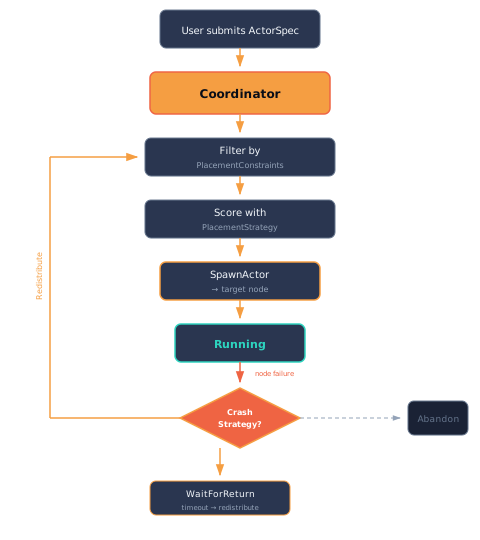
The orchestration layer answers three questions:
- Where should this actor run? — Placement strategies score nodes based on load, capabilities, metadata, and constraints.
- Who decides? — Leader election picks one node to run the Coordinator, which makes all placement decisions.
- What happens when a node fails? — Crash strategies define recovery behavior: redistribute immediately, wait for the node to return, or let the actor die.
Actor specifications
An ActorSpec describes an actor that the orchestrator should place and manage. It captures what to run, how to recover from crashes, and where to place it.
use murmer::app::spec::{ActorSpec, CrashStrategy, PlacementConstraints};
use murmer::cluster::config::NodeClass;
use std::time::Duration;

let spec = ActorSpec::new("storage/photos", "orchestrator::StorageAgent")
    .with_state(serialized_state)
    .with_crash_strategy(CrashStrategy::WaitForReturn(Duration::from_secs(30)))
    .with_constraints(PlacementConstraints {
        required_classes: vec![NodeClass::Worker],
        required_metadata: [("volume".into(), "photos".into())].into(),
        ..Default::default()
    });
Fields
| Field | Purpose |
|---|---|
label | Actor label (e.g., "storage/photos") — unique across the cluster |
actor_type_name | Key into the SpawnRegistry — identifies what type of actor to create |
initial_state | Serialized initial state (bincode bytes) sent to the target node |
crash_strategy | What to do when the hosting node fails |
placement | Constraints that filter which nodes are eligible |
Crash strategies
| Strategy | Behavior |
|---|---|
Redistribute | Move to another eligible node immediately (default) |
WaitForReturn(Duration) | Wait for the failed node to rejoin; fall back to Redistribute on timeout |
Abandon | Let the actor die with the node — no recovery |
Placement constraints
Constraints filter eligible nodes before the placement strategy scores them:
PlacementConstraints {
    required_classes: vec![NodeClass::Worker],        // must be a Worker node
    required_metadata: [("gpu".into(), "true".into())].into(), // must have gpu=true
    anti_affinity_labels: vec!["db/primary".into()],  // repel: don't co-locate with this actor
    colocate_with: Some("writer/c1".into()),          // attract: only where "writer/c1" already runs
    required_node_id: None,                            // or hard-pin to exactly one node id
    ..Default::default()
}required_classes— empty means any class is acceptable.required_metadata— the node must have all specified key-value pairs.anti_affinity_labels— avoid placing on nodes already running these actors (repel).colocate_with— place only on a node already running the named anchor actor (attract — the inverse of anti-affinity). Use it to pin a member next to a partner (e.g. a reader next to its writer). Because it is a hard filter, if no node runs the anchor the spec getsNoEligibleNodesrather than landing elsewhere.required_node_id— hard-pin to exactly one node id; if that node is not alive the spec getsNoEligibleNodes(it is never silently relocated — unlike the softPinnedstrategy).
colocate_withandrequired_node_idare hard filters, not preferences — they are how you build co-located actor groups and node-pinned placement on top of the Coordinator.
Placement strategies
The PlacementStrategy trait defines a fitness function that scores nodes for hosting a given actor spec. The Coordinator evaluates all eligible nodes (after constraint filtering) and picks the highest scorer.
trait PlacementStrategy {
    fn fitness(&self, node: &NodeInfo, spec: &ActorSpec, view: &ClusterView) -> f64;
}- Return
0.0or negative to indicate “do not place here”. - Higher values mean stronger preference.
- The full
ClusterViewis available for global-aware decisions (e.g., load balancing).
Built-in strategies
| Strategy | Behavior |
|---|---|
LeastLoaded | Place on the node running the fewest actors |
RandomPlacement | Uniform random selection across eligible nodes |
Pinned(node_id) | Always prefer a specific node; fall back if unavailable |
Leader election
The LeaderElection trait is pluggable. The Coordinator only runs on the elected leader node.
trait LeaderElection {
    fn elect(&self, view: &ClusterView) -> Option<String>;
}
The default implementation, OldestNode, picks the node with the lowest incarnation counter. This is deterministic — all nodes independently compute the same answer without a consensus round.
use murmer::app::election::OldestNode;
use murmer::cluster::config::NodeClass;

// Any alive node can be leader
let election = OldestNode::any();

// Only Edge nodes can be leader
let election = OldestNode::with_class(NodeClass::Edge);
The Coordinator
The Coordinator is itself a murmer actor (dogfooding the framework). It maintains a ClusterView, accepts SubmitSpec messages, and handles crash recovery when nodes fail.
Lifecycle
- The Coordinator starts on the elected leader node.
- It subscribes to cluster events to track node joins and failures.
- Users send
SubmitSpecmessages to declare what actors should run. - The Coordinator evaluates placement constraints and strategies, then sends
SpawnActorcontrol messages to target nodes. - When a node fails, the Coordinator re-places affected actors according to each spec’s
CrashStrategy.
The cluster event bridge
The bridge (murmer::app::bridge) connects the raw cluster machinery to the Coordinator. It subscribes to ClusterEvents and translates them into Coordinator messages (NotifyNodeJoined, NotifyNodeFailed, NotifyNodeLeft, NotifySpawnAck). This keeps the Coordinator decoupled from the transport layer.
The recommended setup uses bridge::start_coordinator():
use murmer::app::bridge;
use murmer::app::coordinator::CoordinatorState;
use murmer::app::placement::LeastLoaded;
use murmer::app::election::OldestNode;

let cluster = system.cluster_system().unwrap();
let state = CoordinatorState::new(
    cluster.identity().node_id_string(),
    Box::new(LeastLoaded),
    Box::new(OldestNode::with_class(NodeClass::Edge)),
);

let coordinator = bridge::start_coordinator(cluster, state);
This wires up everything: the Coordinator actor, the event bridge loop, and the spawn drain loop.
The spawn drain loop
The spawn drain loop reads placement decisions from the Coordinator and dispatches them — either invoking a local spawn factory or sending a SpawnActor control message to a remote node. Each request is dispatched as an independent tokio::spawn task so factories run concurrently; acks arrive at the Coordinator in any order (keyed by request_id).
An AckGuard ensures that every spawn request receives an acknowledgement, even if the factory panics or the task is cancelled. On the happy path the factory calls ack(true, None). If the guard is dropped without an explicit ack (panic, cancellation), it fires a detached task to deliver a failure ack so the Coordinator’s pending_spawns map never leaks stale entries.
The cluster view
The ClusterView is the Coordinator’s world model — a snapshot of all nodes with their capabilities and running actors:
// Query the Coordinator's view
let view = coordinator.send(GetClusterView).await?;
println!("Alive nodes: {}", view.alive_count);
println!("Total nodes: {}", view.total_count);

// Query managed specs
let specs = coordinator.send(GetSpecs).await?;
for spec in &specs {
    println!("{}: {:?} on {}", spec.label, spec.state, spec.node_id);
}
Each node in the view carries:
- Identity — name, host, port, incarnation counter
- Class —
Worker,Edge,Coordinator, etc. - Metadata — arbitrary key-value pairs (e.g.,
"volume" = "photos") - Running actors — labels of actors currently hosted
- Liveness — whether the node is reachable
Cluster singletons
Some actors must have exactly one instance across the whole cluster — a catalog owner, a sequence minter, a lock manager. A cluster singleton is a Coordinator-managed actor pinned to an anchor, with a fenced handoff so two instances never run at once.
use murmer::app::singleton::{SingletonSpec, SingletonAnchor};
use murmer::app::coordinator::{StartSingleton, GetSingleton};

// Declare the singleton via the Coordinator.
let ownership = coordinator.send_async(StartSingleton {
    spec: SingletonSpec::new("catalog", "app::Catalog", SingletonAnchor::Leader)
        .with_state(boot_bytes),
}).await??;
assert_eq!(ownership.generation.term, 1);
Or, as a convenience when the Coordinator is registered under the well-known "coordinator" label:
let ownership = system.start_singleton(
    SingletonSpec::new("catalog", "app::Catalog", SingletonAnchor::Leader),
).await?;
Anchors
SingletonAnchor decides which node owns the instance:
| Anchor | Owner |
|---|---|
Leader | Whatever the LeaderElection currently elects |
Class(NodeClass) | The oldest alive node of that class |
Node(node_id) | Exactly that node (no owner if it is down) |
The generation fence
Every ownership grant carries a monotone SingletonGeneration { term, seq }:
termbumps once per ownership change (a failover or move) — an FDB-style recovery epoch.seqbumps on a re-grant to the same owner (liveness renew / idempotent re-assert).
SingletonGeneration orders lexicographically (term-major) and packs into a single u64 via packed() — so a downstream fence that compares one integer (e.g. a write generation stamped on disk) rejects a stale ex-owner with no change to that comparison. A node that loses ownership and later returns necessarily holds a strictly-lower generation than its successor, so its first fenced write is rejected.
Failover
When the owner node leaves or fails, the Coordinator re-places the singleton on a surviving node that still satisfies the anchor, minting a strictly-higher term. The old owner is gone, so there is no drain — the generation fence is what guarantees a zombie ex-owner cannot double-write:
// Owner departs → the Coordinator re-drives to a survivor with term N+1.
let after = coordinator.send(GetSingleton { label: "catalog".into() }).await?.unwrap();
assert!(after.generation > before.generation); // strictly higher — the fence
The coordination backend
Singleton correctness across nodes comes from one swappable authority — the coordination backend, the GenerationSource trait — which owns two durable facts per singleton: the monotone fence generation (so two owners can never hold an equal token) and the spec (so a newly-elected leader can rebuild the managed set). Because correctness lives in the backend being a single authority, it works at 1, 2, or N nodes with no quorum among the nodes themselves.
By default the Coordinator uses an in-memory source (CoordinatorGenerationSource) — fine for a single node or tests, but as a per-node source it does not share monotonicity across writers and is not durable across a restart. For multiple nodes, inject one shared durable source that every node reaches:
let state = CoordinatorState::new(local_id, Box::new(LeastLoaded), Box::new(OldestNode::any()))
    .with_generation_source(my_shared_durable_source);
The trait’s methods: claim_term (begin a new ownership epoch — higher term), claim_seq (re-grant within the term), current (read ownership), put_spec (persist the spec), and list (all specs + ownership, for leader rebuild). put_spec/list default to no-ops, so a source that only fences still compiles; implement them to also close the amnesia gap — without them a leader that fails takes its singletons’ specs with it and the new leader silently orphans them. With a shared backend the new leader’s load_singletons_from_backend reads the persisted specs and re-places each at a strictly-higher term.
Pick a backend by deployment:
- In-memory — single node, dev, tests.
- Durable shared store — multi-node: a file-backed store for dev, or a real store (a database row, or appdata’s catalog, which already has the atomic compare-and-swap this needs) for production. One linearization point; no node-to-node consensus.
- Raft — opt-in for 3+ node, survive-a-split, no-external-store deployments. Not the default: a 2-node Raft cluster tolerates zero failures, so it does not fit the 1-to-N (including 2) goal. The trait stays async/fallible/intent-based with an opaque ticket precisely so a Raft backend can drop in later. See the coordination backend decision record.
Full example: Filesystem RPC
The orchestrator example demonstrates the full orchestration loop:
- Three nodes form a cluster: a gateway (Edge class) and two workers (store-a, store-b).
- Each worker advertises capabilities via metadata (
"volume" = "photos"or"volume" = "docs"). - The gateway runs a Coordinator that places
StorageAgentactors on workers matching their placement constraints. - Clients query storage agents for directory listings and file reads — transparently routed across the cluster.
- Node failure triggers crash strategy handling.
// Submit a spec with placement constraints
let result = coordinator.send(SubmitSpec {
    spec: ActorSpec::new("storage/photos", "orchestrator::StorageAgent")
        .with_state(photos_state_bytes)
        .with_crash_strategy(CrashStrategy::WaitForReturn(Duration::from_secs(30)))
        .with_constraints(PlacementConstraints {
            required_classes: vec![NodeClass::Worker],
            required_metadata: [("volume".into(), "photos".into())].into(),
            ..Default::default()
        }),
}).await?;

// The Coordinator placed the actor — now query it from any node
let photos = system.lookup::<StorageAgent>("storage/photos").unwrap();
let entries = photos.send(ListDir { path: "/".into() }).await?;
Run the example:
cargo test -p murmer-examples --test orchestrator