Clustering
One of murmer’s core design goals is that your actor code doesn’t change when you go from a single process to a multi-node cluster. The same Endpoint<A> API works in both cases.
Step 1: Run everything locally
Create a System::local() — no networking, no config. Your actors communicate through in-memory channels with zero serialization cost:
use murmer::prelude::*;

let system = System::local();

let room = system.start("room/general", ChatRoom, ChatRoomState {
    room_name: "general".into(),
    messages: vec![],
});

// Send messages via extension trait — works instantly
room.post_message("alice".into(), "Hello!".into()).await?;

// Look up actors by label
let ep = system.lookup::<ChatRoom>("room/general").unwrap();
let history = ep.get_history().await?;
Step 2: Go distributed
When you’re ready for real networking, swap System::local() for System::clustered(). Your actor code stays identical — only the system construction changes:
use murmer::prelude::*;
use murmer::cluster::config::ClusterConfig;

let config = ClusterConfig::builder()
    .name("alpha")
    .listen("0.0.0.0:7100".parse()?)
    .advertise("192.168.1.5:7100".parse()?)
    .cookie("my-cluster-secret")
    // Seeds are dialed by endpoint id, not bare address. Get the seed's id by
    // running `murmer id` on it (or read the `seed:` line it prints at startup).
    .seed_nodes([iroh::EndpointAddr::from_parts(
        seed_endpoint_id,
        [iroh::TransportAddr::Ip("192.168.1.1:7100".parse()?)],
    )])
    .build()?;

// clustered_auto() discovers all #[handlers]-annotated actor types automatically
let system = System::clustered_auto(config).await?;

// Same API as local — start, lookup, send
let room = system.start("room/alpha", ChatRoom, state);
room.post_message("alice".into(), "Hello!".into()).await?;

// Actors on other nodes appear automatically via registry replication
let remote_room = system.lookup::<ChatRoom>("room/beta").unwrap();
remote_room.get_history().await?;  // transparently serialized over QUIC
Each node gets a single QUIC connection to every peer, multiplexed over per-actor streams. The OpLog replication protocol uses version vectors for efficient, idempotent sync.
Step 3: Test it interactively
The cluster_chat example lets you try both modes with an interactive CLI:
# Local mode — all actors in one process
cargo run -p murmer-examples --bin cluster_chat -- --local
=== murmer cluster_chat (local mode) ===
  Started room: #general
  Started room: #random

> post general alice Hello everyone!
  [1 messages in #general]
> post general bob Hey alice!
  [2 messages in #general]
> history general
  --- #general ---
  alice: Hello everyone!
  bob: Hey alice!
> rooms
  Known rooms:
    #general — 2 messages
    #random — 0 messages
Same binary, same commands — just add cluster config:
# Terminal 1: seed node. On startup it prints a line like:
#   seed: 5e9c...f0a8@127.0.0.1:7100  (pass to another node with --seed)
cargo run -p murmer-examples --bin cluster_chat -- --node alpha --port 7100

# Terminal 2: joins via the seed's id@address (copy alpha's `seed:` line)
cargo run -p murmer-examples --bin cluster_chat -- \
    --node beta --port 7200 --seed 5e9c...f0a8@127.0.0.1:7100
Each node now has a persistent identity key (its iroh endpoint id). The
cluster_chatexample writes one to<node-name>.keyso the id is stable across restarts. A seed is<endpoint-id>@<host:port>, because iroh dials by key and the address alone is no longer enough. See Administration & Security.
Step 4: Deploy with Docker
The docker-compose.yml in the repo runs a 3-node cluster with no manual setup:
docker compose up --build
Nodes are dialed by key, so the joiners need the seed’s endpoint id. The container
entrypoint (docker-entrypoint.sh) handles that automatically. Each node generates
its own persistent key in a shared ./keys volume, publishes its public endpoint
id to /keys/<node>.id, and the joiners wait for the seed’s id file and dial it by
key. The compose file just names each node and points the joiners at the seed:
services:
  alpha:
    build: .
    environment:
      MURMER_NODE: alpha          # seed node (no MURMER_SEED)
    volumes:
      - ./keys:/keys

  beta:
    build: .
    environment:
      MURMER_NODE: beta
      MURMER_SEED: alpha          # join via alpha's published id
    volumes:
      - ./keys:/keys

  gamma:
    build: .
    environment:
      MURMER_NODE: gamma
      MURMER_SEED: alpha
    volumes:
      - ./keys:/keys
Beta and gamma seed from alpha and mesh together. Keys persist in ./keys, so node
identities are stable across docker compose restart. Only the public .id files
are read by other nodes; each node’s secret key stays in its own .key file.
On a flat LAN you can skip seeds entirely and let mDNS discover peers (it now advertises each node’s endpoint id). Multicast across a Docker bridge network is unreliable, which is why the compose demo uses id-based seeds instead.
How clustering works
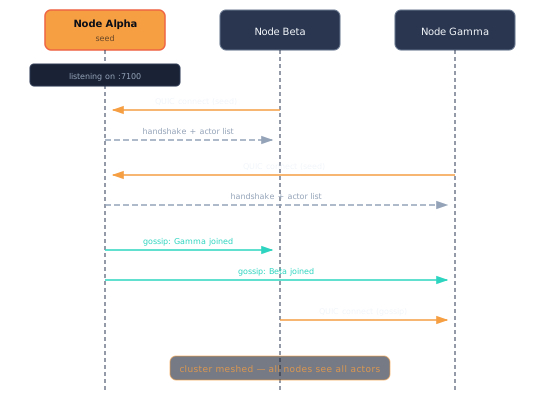
Auto-discovery
When an actor system starts in clustered mode, it runs a server that listens for incoming connections. New nodes connect to existing ones via seed nodes and begin exchanging information about their actors. Nodes can be configured to gossip this information, allowing the network to mesh together organically.
Networking layer
The networking layer is built on iroh (a QUIC stack) and SWIM (via the foca crate):
- iroh provides a reliable, low-latency QUIC transport where each peer is identified and authenticated by an ed25519 endpoint id (a public key), not by IP address. host:port becomes an addressing hint iroh uses to establish the direct connection. Each node pair shares a single connection, multiplexed over per-actor streams. The authenticated endpoint id is what makes the zero-trust allowlist possible.
- SWIM handles cluster membership — failure detection, protocol-level heartbeats, and member state dissemination. Membership is keyed on the endpoint id.
- mDNS provides optional zero-configuration discovery for LAN environments, advertising each node’s endpoint id so peers can dial it by key.
Stream architecture
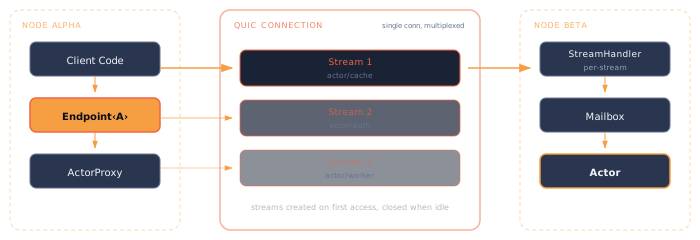
When a remote actor’s endpoint is accessed:
- A dedicated QUIC stream is opened to the remote node for that actor.
- The stream stays open as long as it’s active (not idle).
- On the receiving end, a stream handler deserializes incoming messages, looks up the target actor via the receptionist, and forwards them.
- Each stream binds to a single actor — messages for other actors result in an error and stream closure.
- The stream subscribes to the actor’s lifecycle via the receptionist. If the actor enters a negative state (stopped, dead), the stream closes with an error.
An actor on a node might have multiple inbound streams, but the mailbox system ensures messages are processed in order of arrival.
Registry replication
Actor registrations are replicated across the cluster using an OpLog with version vectors:
- When a local actor registers, its node broadcasts an
ActorAddoperation to all peers. - Remote nodes create lazy endpoint factories in their local receptionists.
- Version vectors ensure operations are idempotent and ordering is preserved.
- When a node leaves, its registrations are pruned from all other nodes.
This gives every node an eventually consistent view of the entire cluster’s actor topology.